Meeting notes that never fall through the cracks
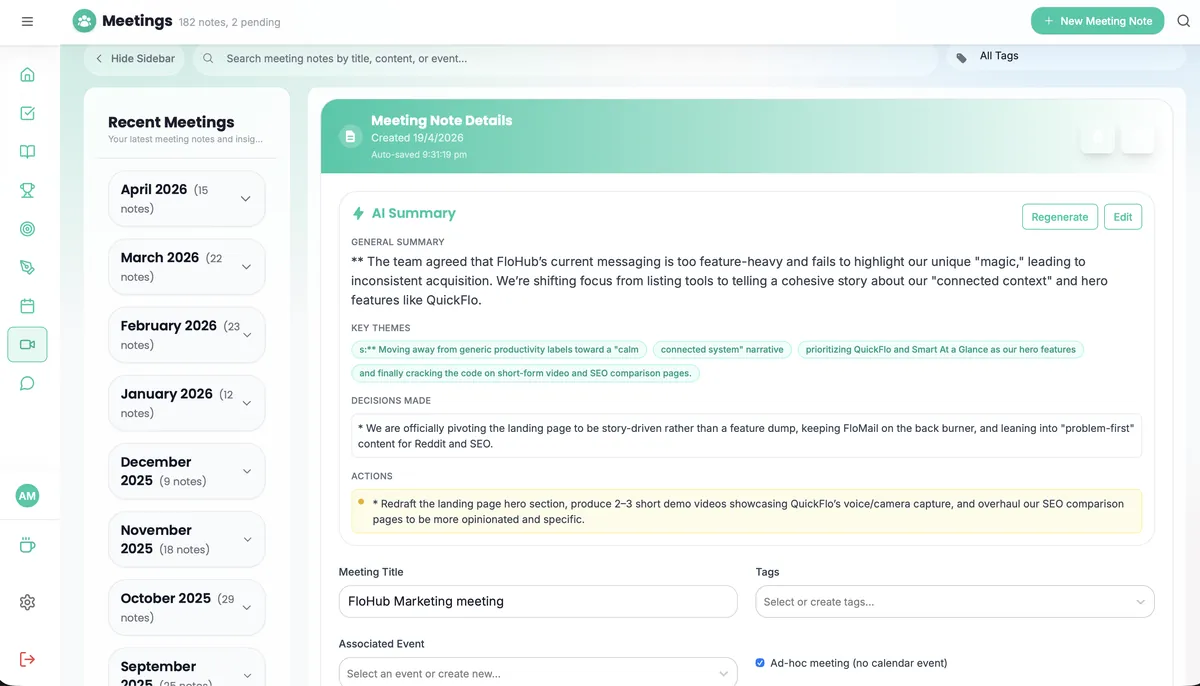
FloHub links your meeting notes directly to calendar events, extracts action items, and makes past decisions searchable in seconds. No more digging through separate note apps after a call.
Free forever on the web · apps free for 30 days
Everything you need, nothing you don't.
Calendar-Linked Notes
Create notes that attach directly to calendar events. Every meeting has a home, and you can find the right notes in one click.
AI Action Item Extraction
FloCat reads your meeting notes and pulls out action items automatically — ready to add to your task list with one tap.
AI Meeting Summary
Ask FloCat to summarize a meeting note into a shareable recap. Useful for sending updates to stakeholders who missed the call.
Tags & Labels
Tag meeting notes by project, client, or topic. Filter your notes library to find every conversation about a specific subject.
Full-Text Search
Search across all your meeting notes instantly. Find any decision, name, or action item from any meeting you ever captured.
Linked to Tasks
Convert action items from meeting notes into tasks with one tap. The task stays linked to the meeting note for full context.
Meeting notes, ready before the meeting — only in the app.
Everything on the web stays free. The apps add the things a browser can't do:
- Your phone's calendarsAttach notes to any event already on your phone, including work accounts.
- “Hey Siri, new meeting note”Start a meeting note hands-free with Siri and Shortcuts.
- Reminders before you walk inPush notifications for upcoming meetings and follow-ups.
- Enhanced offline supportTake notes in a basement meeting room with no signal.

30-day free trial

Why meeting notes belong in your daily workspace
Decisions don't vanish after the meeting ends
When meeting notes live in a separate app or a random doc, they get lost. FloHub links every note to its calendar event — so the context is always one click away from your schedule.
Action items become tasks automatically
FloCat reads your notes and surfaces action items you can add to your task list directly. No more rewriting what you discussed — the AI does the extraction for you.
You'll actually review your notes
When notes are linked to the calendar event, tomorrow's meeting reminds you to review last week's notes from the same recurring call. Pattern and context build naturally.
Fast search when it matters
"What did we decide about the budget in that April meeting?" FloHub's full-text search finds it in a second, even if you wrote the note months ago.
Built for real workflows
For recurring team meetings
Link notes to your weekly standup or sprint review calendar events. Build a searchable history of decisions without manually filing anything.
For client calls
Capture every client conversation linked to the calendar event. Before the next call, one click shows exactly what you discussed and committed to last time.
For one-on-ones
Keep a running linked note for each recurring 1:1. Over time it becomes a conversation history that helps you support your team members better.

Never lose a meeting decision again
Free forever on the web. Add the iPhone & Android apps — free for 30 days — for your phone's calendars, Siri and offline note-taking.
30-day free trial